Scam Alerts
This page explains how to spot a scam, current scam examples and what you should do if you suspect you may have encountered a scam. If you receive any suspicious communications that appear to be from Woolworths and need assistance, please forward them directly to hoax@woolworths.com.au for further investigation by our Cyber Security team. Additional resources are also included at the bottom of the page.
What are scams, how to stay safe and where to get help?
What is a scam?
Scams are malicious acts by online criminals to collect information about customers which can then be used to steal an individual's money, personal and/or financial information. Your personal information could potentially be used to steal your identity, sold on the dark web and in some cases used to demand a ransom. It can be a frightening experience and even the most scam savvy customers can fall prey.
What to look for
Scams are designed to look authentic, copying features from our branding, such as our logo and colour scheme. At Woolworths, we want our customers to be equipped with the right information to know what to look out for and how to spot the difference between legitimate communication from us and communication distributed by scammers.
Be careful of links
Links embedded in scam messages will often direct you to a fake website which may look real, but will have a different web address not associated with Woolworths or any of our brands. The differences may be very subtle, such as www.wollwoorths.com.au instead of www.woolworths.com.au
How to help protect yourself from scams
Unique Passwords
Ensure you DO NOT re-use the same password to access your Woolworths account that you use to access other online accounts.
Using the same password to access multiple different accounts may pose a risk. If one of your online accounts is compromised, cyber criminals may also be able to access ALL your other online accounts.
Strong Passwords or Passphrases
It is important that your password does not incorporate your personal information, such as name, email, address or date of birth. Additionally, passwords should never include sequential letters or numbers (e.g. abcde/12345), nor should they compromise one single word that can be found in the dictionary.
Rather than using a password, consider using a passphrase.
A passphrase usually strings together three or more words that have meaning to you. This will make it easy for you to remember, but difficult for any unauthorised person to discover.
Ideally, a passphrase would have over 8 characters, although longer passphrases offer even greater security. You may also incorporate upper and lower case letters, numbers and other characters to make your passphrase even stronger.
Ensure you immediately update your password or passphrase whenever you suspect it has been compromised. Periodically, Woolworths will recommend that customers update their Woolworths account password as a precautionary measure and we urge customers to heed such recommendations.
Multi-Factor Authentication
At Woolworths, we enable Multi-Factor Authentication, or MFA. This means that you need your password, as well as a One-Time-Passcode (OTP) that will be sent to your landline or mobile phone in order to login to your Woolworths account.
While MFA offers significantly stronger security, it is still important to remain vigilant. Should you unexpectedly receive One-Time-Passcodes on your landline or mobile phone, this may indicate that an unauthorised person is attempting to login to your account. In these circumstances, you should immediately update your password and report the matter to Woolworths.
Additionally, it is important that you NEVER disclose a One-Time-Passcode to anyone else. Woolworths team members will NEVER ask you to reveal a One-Time-Passcode.
Social Engineering
Social Engineering is a tactic used by cyber criminals to trick people into:
Revealing confidential information (such as passwords, One-Time-Login codes, or financial information like your credit card details), or
Taking risky action (such as enabling another person to access their computer or installing suspicious software).
Woolworths team members will not contact you asking for your password or One-Time-Login codes in order to login to your account. Nor will Woolworths team members request remote access to your computer/mobile phone, or ask you to install software.
If you receive any unexpected or unusual communication from someone claiming to represent Woolworths, whether via phone call, email, SMS, or other messaging platform:
DO NOT engage with the person contacting you
DO NOT reply to the message
DO NOT click on links or open any attachments.
Fake Shopping Sites/Apps
Scammers may seek to trick people into visiting fake shopping sites or downloading fake apps and:
Transferring funds to them, or
Revealing confidential information (such as passwords, One-Time-Login codes, or financial information like your credit card details)
Scammers may direct users to these fake shopping sites or apps through social engineering as described above, or by social media posts promoting free giveaways/special offers, or fake advertisements.
Products are often advertised as heavily discounted or free (often on completion of a short survey) with only a small shipping fee payable. Always remember that if something seems too good to be true, it usually is.
Avoid clicking on links in suspicious social media posts, or those sent via email, SMS, or other messaging platforms. These may direct you to fake sites/apps that are designed to look identical to our legitimate sites/apps.
It is advisable to:
Access our website directly by typing the correct URL into your web browser.
Double-check that you are browsing on https://www.woolworths.com.au (and not a phishing or look-alike website) and look for the padlock icon in your browser.
Only install our apps from trusted platforms, such as the Apple App Store or Google Play.
Report any suspicious activities to our cyber team via: hoax@woolworths.com.au or hoax@woolworths.co.nz.
Should you have any further questions, you can visit the Contact Us page on our website and speak with a member of our team directly.
For additional resources, please see the organisations listed at the bottom of this page.
Top tip
Stay vigilant, think before you click!
Current scams
Social media scams
Scammers are leveraging social media in attempts to collect personal information and personalise their communications with you. Be careful what content you engage with online and verify what you are engaging with is from Woolworths’ legitimate channels.
Be suspicious of:
Newly-created profiles with limited content
Grammar and spelling errors
A profile you thought you were already connected with. It could be a cloned account
A profile of someone you have never met and do not know
Profiles with a description you would find on a dating website
Contain a different URL address than the one you would expect when you hover over it

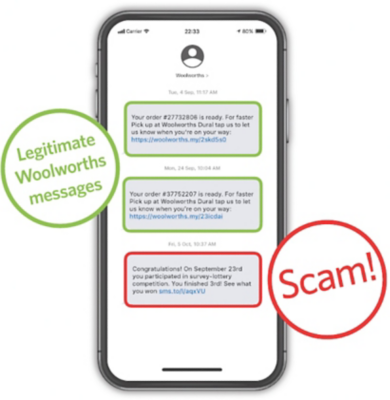
SMS scams
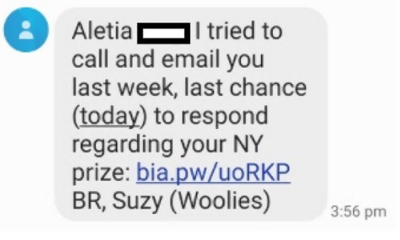
Smishing or SMS scams are a popular way online criminals persuade you to tap on a link. SMS scams are often specifically crafted to look like they are from a legitimate organisation and encourage you to verify your details to claim a prize by tapping a link contained within the message. The link may take you to a website that asks you to verify your account details by entering them on the website or even compromise the information on your phone by downloading malicious software.
Be suspicious of messages that:
Contain instructions to click on a link, pop-up, or attachment
Create a sense of urgency by attempting to rush, scare or entice you
Request sensitive, personal and/or financial information
Are from individuals or organisations that don’t usually contact you
Profiles with a description you would find on a dating website
Contain a different URL address than the one you would expect when you hover over it
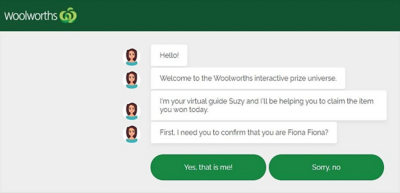
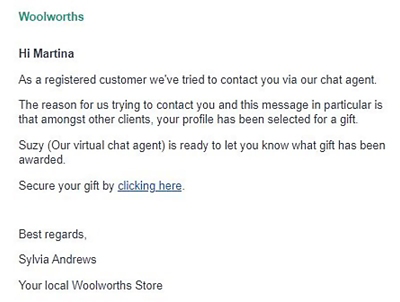
Email phishing scams
Phishing is a socially engineered attack designed to trick users into clicking malicious links or giving up personal information. Phishing emails are designed to look like they’re coming from a credible source or website, but they’re actually sent by online criminals.
Be suspicious of emails that:
Contain instructions to click on a link, pop-up, or attachment
Create a sense of urgency by attempting to rush, scare or entice you
Request sensitive, personal and/or financial information
Contain branding or spelling that doesn't feel quite right
Are from individuals or organisations that don’t usually contact you
Contain a different URL address than the one you would expect when you hover over it
Profiles with a description you would find on a dating website
Contain a different URL address than the one you would expect when you hover over it


Phone scams
Telephone-based scam callers often claim to be from organisations you know, such as Woolworths, the Government, or other well known brands. These scam callers leverage the good brand and reputation of businesses in an attempt to trick you into sharing your personal or financial information, or even giving them access to your computer remotely.
Be suspicious of calls that:
Are from an unknown or blocked number
Request sensitive, personal and/or financial information
Imitate well known organisations or Government organisations
Urge you to pay for bills via gift cards
Imitate support staff looking to access your computer remotely
Gift card scams
Scammers are claiming to work for government agencies, such as the Police, and instructing victims to urgently purchase gift cards to repay fines. After the cards have been purchased, the victim is asked to share the 16-digit code on the back of the card. Governments will never request gift cards as a form of payment. If you ever receive a call like this, hang up the phone immediately.
Be suspicious of people or organisations that:
Ask you to pay for items or fines with gift cards, such as iTunes gift cards
Ask you to share the 16 digit code on the back of a gift card over the phone


Archive - previous scams
Responsible disclosure
Security is core to our values, and we appreciate the input of security researchers acting in good faith to help us maintain a high standard for the security and privacy of our customers, team, business partners, and the communities we serve.
Woolworths expects security researchers to act with integrity and does not condone the engagement of the following activities:
- Security research that involves potential or actual damage to Woolworths users, systems, applications, customers or partners.
- Testing and research activities that violate laws and regulations, or in a way that would adversely affect our systems and data.
Woolworths expects security researchers to keep any findings confidential and to provide us a reasonable amount of time to resolve the issue before you disclose it publicly.
To report a potential security vulnerability associated with Woolworths Supermarkets, Countdown Supermarkets, Big W, or our Rewards brand, email vulnerabilitydisclosure@woolworths.com.au
For more information about how we handle your personal information in regards to Security Vulnerability Disclosures please see our collection notice here
Additional resources
To find out more information on scams, or how to get help should you fall victim to a scam, visit the following websites:


