
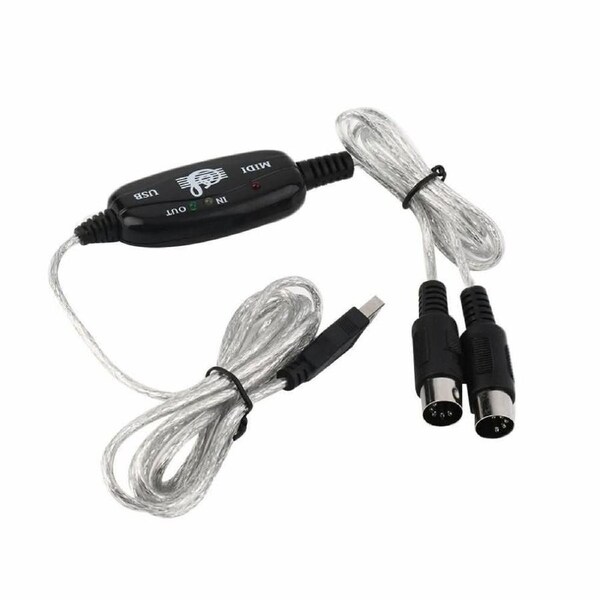


USB IN-OUT MIDI Interface Cable Converter PC to Music Keyboard Adapter Cord
- Simply connect the USB cable into your computer, and your MIDI interface connection is completed.
- Easy to turn your PC into a music studio, start by connecting a music keyboard to your computer with the supplied USB MIDI Cable.
- USB powered and Class Compliant for true plug & play.
- 16 MIDI input channels ,16 MIDI output channels.
- LED's indicate power on,MIDI in signal and MIDI out signal.
- Supports Windows 10/8/7/XP/Vista and Mac OS X operating systems.
Make Music recording by connecting a music keyboard to your computer with the USB MIDI cable with input/output.
Using Instruction:
- Connect the cable marked "IN" to the MIDI "OUT" socket of a MIDI keyboard (or MIDI device)
- Connect the cable marked "OUT" to the MIDI "IN" socket of a MIDI keyboard (or MIDI device)
- Plug the USB cable into any free USB socket on your computer, the red LED will light to show power on.
- Open you music software program, e.g. Cubase, Sonar, MIDI connections, etc.
- Set the music in programs MIDI in and MIDI out devices to "USB Audio Device"
- Your USB to MIDI interface is now ready for use
- To save potential problems, it is recommended that this interface is always connected to the same USB as it was originally installed on to prevent multiple installations of the driver
Package includes:
- 1 x USB MIDI Cable
Order before 2pm and we promise to dispatch on Same Day !
SYD, MEL, BRI, ADL orders are delivered within 1-2 days. Others within 2-5 days.
Warranty
Our goods come with guarantees and 12 months Australian Warranty.
Covers any defects in materials used to manufacture your product
Covers any defects in workmanship under normal use
Covers any broken components under normal use
Change of Mind Returns
We have a 14-days return policy, which means you have 14 days after receiving your item to request a return. For change of mind returns, your item must be in the same condition as you received it, unworn or unused, with tags, and in its original packaging.
How to Return?
To start a return, please contact us via email. If your return is accepted, we’ll send you a return shipping label, as well as instructions on how and where to send your package.