
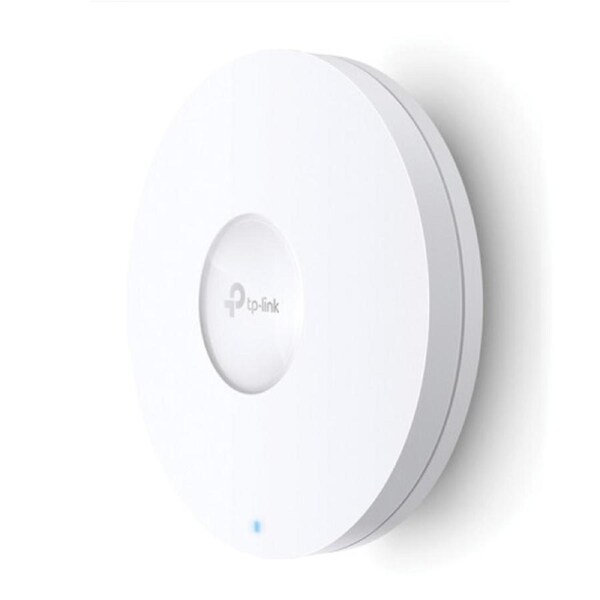


TP-Link EAP620 HD AX1800 Wireless Dual Band Ceiling Mount Ac
TP-Link EAP620AX1800 Wireless Dual Band Ceiling Mount Access Point
- Ultra-Fast Wi-Fi 6 Speeds: Simultaneous 574 Mbps on 2.4 GHz and 1201 Mbps on 5 GHz totals 1775 Mbps Wi-Fi speeds.
- High-Density Connectivity: 4- increased capacity to connect more devices simultaneously.
- Integrated into Omada SDN: Zero-Touch Provisioning (ZTP)§, Centralised Cloud Management, and Intelligent Monitoring.
- Centralised Management: Cloud access and Omada app for ultra convenience and easy management.
- Seamless Roaming: Even video streams and voice calls are unaffected as users move between locations.?
- PoE+ Support: Supports Power over Ethernet (802.3at) for convenient deployment and installation.
- Secure Guest Network: Along with multiple authentication options (SMS/Facebook Wi-Fi/ Voucher, etc.) and abundant wireless security technologies.
High-Density Connectivity with 4- Increased Capacity
OFDMA* and Uplink & Downlink MU-MIMO** increase network capacity by up to 4- versus Wi-Fi 5 (802.11ac) in high-density environments to connect more devices simultaneously. Leverage multi-user capabilities and upgrade your business like never before.
Advanced Wi-Fi Speed with 4 Spatial Streams
The Omada Wi-Fi 6 Access Point features the latest 802.11ax technologies like 1024 QAM and Long OFDM Symbol, which allows the EAP to boost overall speeds up to 1775 Mbps (1201 Mbps on a 5 GHz band and 574 Mbps on a 2.4 GHz band) . With 8 spatial streams, multi-user throughput is incredibly increased to drive more applications.
Seamless Roaming
802.11k/v roaming switches clients automatically to the AP with the optimal signal with a seamless transition when moving.? This allows sensitive applications like VoIP and video conferences to go uninterrupted.
Band Steering
Automatically moves dual band devices onto the wider 5GHz band for faster connections.
Load Balance
Ensures large numbers of users have smooth network experiences in high-density business networks
Airtime Fairness
Increases average network throughput in heavily congested environments
Secure Guest Network with Facebook Wi-Fi and SMS Login
Guest Network provides elevated secure access to guests sharing your Wi-Fi network, with captive portal helping maintain only authorized guests to use the network. The addition of SMS and Facebook authentication simplifies the captive portal even further to simplify connectivity and power up your business.
HARDWARE FEATURES
Interface 1- Gigabit Ethernet (RJ-45) Port (supports IEEE802.3at PoE)
Button Reset
Power Supply 802.3at PoE
12 V DC
Power Consumption EU: 12 W
US: 13.5 W
Dimensions ( W x D x H ) 9.6 - 9.6 - 2.5 in (243 - 243 - 64 mm)
Antenna Type Internal Omni
2.4 GHz: 2- 4 dBi
5 GHz: 2- 5 dBi
Mounting Ceiling /Wall Mounting (Kits included)
WIRELESS FEATURES
Wireless Standards IEEE 802.11ax/ac/n/g/b/a
Frequency 2.4 GHz and 5 GHz
Signal Rate 5 GHz: Up to 1201 Mbps
2.4 GHz: Up to 574 Mbps
Wireless Functions 1024-QAM
4- Longer OFDM Symbol
OFDMA
Multiple SSIDs (Up to 16 SSIDs, 8 for each band)
Enable/Disable Wireless Radio
Automatic Channel Assignment
Transmit Power Control (Adjust Transmit Power on dBm)
QoS(WMM)
MU-MIMO
Seamless Roaming?
Omada Mesh?
Band Steering
Load Balance
Airtime Fairness
Beamforming
Rate Limit
Reboot Schedule
Wireless Schedule
Wireless Statistics based on SSID/AP/Client
Wireless Security Captive Portal Authentication?
Access Control
Wireless Mac Address Filtering
Wireless Isolation Between Clients
SSID to VLAN Mapping
Rogue AP Detection
802.1X Support
WEP, WPA-Personal/Enterprise, WPA2-Personal/Enterprise, WPA3-Personal/Enterprise
Transmission Power CE:
<20 dBm(2.4 GHz, EIRP)
<23 dBm(5 GHz, EIRP)
FCC:
<25 dBm (2.4 GHz)
<25 dBm (5 GHz)
MANAGEMENT
Omada App Yes
Centralized Management Omada Hardware Controller (OC300)
Omada Hardware Controller (OC200)
Omada Software Controller
Cloud Access Yes (Through OC300, OC200, or Omada Software Controller)
Email Alerts Yes
LED ON/OFF Control Yes
Management MAC Access Control Yes
SNMP v1, v2c, v3
System Logging Local/Remote Syslog Local/Remote Syslog
SSH Yes
Web-based Management HTTP/HTTPS
L3 Management Yes
Multi-site Management Yes
Management VLAN Yes
At Harris Technology we offer Standard delivery options. In order to maximise efficiency and minimise delays we currently use a combination of shipping from our own inventory as well as using our suppliers who provide drop ship delivery where applicable.
Orders for stocked items typically depart within 1 - 3 Working days of receipt of order and payment confirmation during business days (Monday-Friday, excluding public holidays.)
Delivery times for Standard shipping may vary depending upon your proximity to metropolitan areas of each capital city, with customers typically receiving delivery following despatch within 2 - 3 Working Days.
For customers who reside outside of metropolitan areas, including regional areas. Deliveries can be expected after despatch within 3 - 5 Working Days.
As highlighted at Harris Technology to maximise efficiency and minimise delays we currently use a combination of shipping from our own inventory as well as using our suppliers who provide drop ship delivery where applicable.
If shipping out via Australia Post, it may be necessary to bring the item into our warehouse first. This will typically add about 24-48 hours to the delivery time. If this causes any issues for you, please contact our customer service team in order discuss alternate options.
Our suppliers ship stock via various courier companies, all of which require a signature upon delivery, so please ensure that someone will be at the destination address to minimise any delays in getting your order. For more information on which courier your order is being shipped by, please contact us. Please remember to quote the Order Reference Number when contacting us.
Below you will find information to assist you in finding the quickest solution to any difficulties you may be having with a product purchased from Harris Technology, whether or not the product is covered by warranty.
In most cases help is available directly from the manufacturer, a distributor or a third party.
To understand when you should contact Harris Technology or the manufacturer directly.
If you are unable to find the information you need, please contact us.