
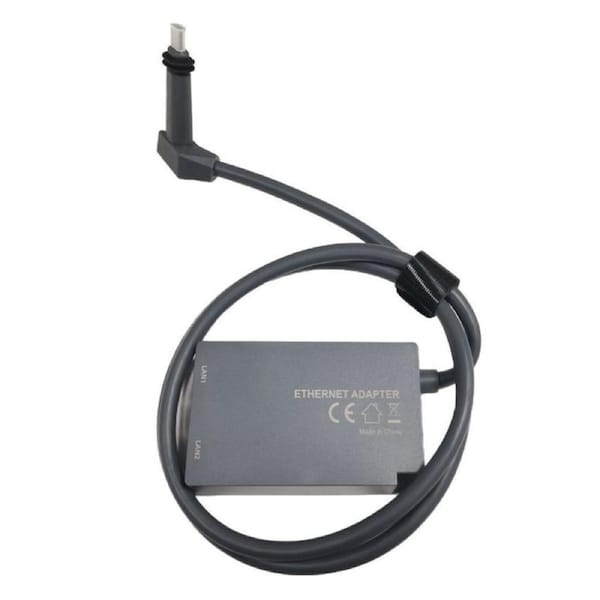
Catzon Ethernet Adapter for V2 Starlink Rectangular Dish and Mesh WiFi Router


p>Specifications:
- Size: 1m
Features:
- 1 to 2 Starlink Ethernet Adapter: The 1 to 2 RJ45 Gigabit Ethernet Splitter provides an efficient network expansion solution, easily expanding Starlink to double RJ45 network ports setup. It supports to network two devices simultaneously, which help you overcome the limitations of insufficient Ethernet ports indoor instead of repeatedly plugging and unplugging cables. Whether you are working, gaming, or streaming, enjoy uninterrupted connectivity that enhances your digital life!
- Dual Ports 1000Mbps Lightning Fast & Rock-Solid Stability: Say goodbye to slow and unstable Wi-Fi! With our double ports starlink ethernet adapter featuring the advanced chip, enjoy a stable high-speed connection with a total bandwidth of up to 1000Mbps for double ports. No more worrying about signal delays or disconnections. Ideal for large downloads, online gaming, and video streaming, this device guarantees an optimal online experience, allowing you to stay focused and productive without interruptions.
- Improved Speeds: This ethernet adapter starlink enabled to connect Starlink V2 dish to existing home mesh Wi-Fi system, significantly boosting the speed. And can extend network to previously unreachable areas of your house due to numerous walls. The direct connection to PC significantly improve internet speeds, providing a more reliable and faster network experience throughout your home.
- Easy Installation: Starlink adapter is driver-free. (Installation Way: 1. Turn off the Starlink router by unplugging its AC power cord from the wall outlet. 2. Unplug the Starlink antenna cable from the bottom of the router. 3. Insert the Starlink ethernet adapter v2 into the port on the router where the Starlink antenna cable was previously connected. 4. Connect the Starlink antenna cable to the connector on the starlink adapter ethernet. 5. Power everything back on by plugging the routers AC power cord back into the wall outlet )
- Easy Installation: Starlink adapter is driver-free. (Installation Way: 1. Turn off the Starlink router by unplugging its AC power cord from the wall outlet. 2. Unplug the Starlink antenna cable from the bottom of the router. 3. Insert the Starlink ethernet adapter v2 into the port on the router where the Starlink antenna cable was previously connected. 4. Connect the Starlink antenna cable to the connector on the starlink adapter ethernet. 5. Power everything back on by plugging the routers AC power cord back into the wall outlet )
Packing includes:
- 1 X Starlink Gen 2 Ethernet Adapter
- Please allow 6-8 business days for delivery
- We ship across Australia, including major cities like: Sydney, Melbourne, Perth, Brisbane, Adelaide, Canberra, Newcastle and the Gold Coast
Warranty Policy
All our products come with a 12 month warranty. The warranty cover does not include for damage caused by accidents, misuse, neglect and lack of maintenance, usual wear and tear, natural disaster or any other external causes.
Returns Policy
If you are unsatisfied with your purchase or you have changed your mind, you can return the products to us in its original packaging and saleable conditions within 30 days from the date of order. Please note that the product must be unused and in brand new condition, otherwise the return will not be accepted. You will be responsible for covering the return costs and the initial shipping is non-refundable.
This product is sold and shipped by our Everyday Market Partner who has provided all relevant product information for this listing. Woolworths does not ensure the accuracy or suitability of the information on this page. Product information is intended as a guide only as products may change from time to time. Please always check the product label or enquire with the manufacturer before consuming. Product ratings and reviews are taken from various sources including Bazaarvoice. Woolworths does not represent or warrant the accuracy of any statements, claims or opinions made in product ratings and reviews.